If you are looking for a template, download this “sample”, because it has not any complication, very easy to follow. Don’t worry about, it will not a headache for you, because it is free of charge, and you have to pay nothing.
If you are managing a small restaurant and want to run it smoothly, then there should be neat system not to face any problem.
A waiting list is a sort of form which will help you to have a record of the visitors who want to have a vacant seat in your restaurant in the flowery evening with their family.
This list will provide the easy way of adopting a system, because the guest makes a dispute & claim that their arrivals are earlier than of others.
In the list make column inside this template and write arrival time of the guest, serving time and information concerning with the waiting guest. There should be a column for the phone numbers to make an immediate contact with the guest.
When they saw long queue, they decide to move towards any mall to shop.
They should be provided with comprehensive information.
When they have been served, you can mark them by checklist in the checklist column. If you will see at a glance you will find at the very moment that which guest have been skipped and have not in a mood to pass their time in your restaurant. Due to shortage of time they didn’t cancel their name form the list. This check list may be arrange in a different way, if you have a creative mind and want to go in your style. Modify it and have a smooth system.
Click here to download this template: http://www.wordtemplatesonline.com/2011/09/restaurant-waiting-list-template/
Showing posts with label Word Templates. Show all posts
Showing posts with label Word Templates. Show all posts
Monday, March 25, 2013

Saturday, August 4, 2012
Hourly Service Invoice
This word template is very much suitable for those people or companies who charge for their services hourly. If you are a programmer and want to complete a project on hourly charge basis from your customer, it will help you in this regard. A lot of people do this practice. You may be a freelance stand promotion girl for an exhibition which will charge the customer on hourly basis. You may be a law consultant and may charge from your client on total hourly basis consultation.
Keep in mind that word template of this kind will help you to fill all the information by manual typing.
If you have databases in micro soft excel files, you can merge it using the mail-merge function. You have a liberty to change it according to your requirement. Chang the design, fonts and also the letterhead, if you wish.
This is a sample of word template. You can use it according to your requirement after making changes in it. Download it from this website with the help of link given below. It is free of charge.
Download it from this link: http://www.mswordtemplates.org/2011/10/hourly-service-invoice-template/
Keep in mind that word template of this kind will help you to fill all the information by manual typing.
If you have databases in micro soft excel files, you can merge it using the mail-merge function. You have a liberty to change it according to your requirement. Chang the design, fonts and also the letterhead, if you wish.
This is a sample of word template. You can use it according to your requirement after making changes in it. Download it from this website with the help of link given below. It is free of charge.
Download it from this link: http://www.mswordtemplates.org/2011/10/hourly-service-invoice-template/
Saturday, July 28, 2012
Blood Pressure Log
Blood pressure may be described as the pressure of blood against the walls of arteries. Its result comes from two forces. One is produced from the heart as it pumps blood into the arteries and through the blood circulation system. The second force produced by arteries, because they make a resistance in the flow of blood.
Usually the health of the people comprise of two numbers such as: ≡ Systolic, which shows the pressure as the heart compress to pump blood to the body. It contains high number.
≡ Diastolic, which shows the pressure while the heart take a minor rest between two beats. It consist lower number. The systolic pressure is described first. As 120/80 (120 and above 80); systolic = 120, diastolic = 80. This is a simple and easy to learn pressure log which is created in words. It can be kept in record and track your blood pressure.
This is a sample of a template. Very easy to understand and follow. In this website you will find a lot of templates, make a choice according to your requirement. Surely you are a sharp minded person, so make changes and amendments in it. Download it from this site (http://officeguru.blogliterature.org/2011/10/blood-pressure-log-template/) and feel not any worry, because it is free of cost.
Usually the health of the people comprise of two numbers such as: ≡ Systolic, which shows the pressure as the heart compress to pump blood to the body. It contains high number.
≡ Diastolic, which shows the pressure while the heart take a minor rest between two beats. It consist lower number. The systolic pressure is described first. As 120/80 (120 and above 80); systolic = 120, diastolic = 80. This is a simple and easy to learn pressure log which is created in words. It can be kept in record and track your blood pressure.
This is a sample of a template. Very easy to understand and follow. In this website you will find a lot of templates, make a choice according to your requirement. Surely you are a sharp minded person, so make changes and amendments in it. Download it from this site (http://officeguru.blogliterature.org/2011/10/blood-pressure-log-template/) and feel not any worry, because it is free of cost.
Friday, July 20, 2012
Wedding Menu Templates
If you are going to wed and you want wedding menu templates which may be used for wedding reception, try this. It is only a sample which is created from the Microsoft Word to put you out of your difficulty. Now think read it for several times and edit it to create your own menu and fill according to your need and requirement coming your way at the reception.
These are two menus in one letter-size page. If you are planning to edit this menu, first color the table border, then you may be able to edit it with line guidance. When you come to an end and complete the editing of this menu, you can make the table border. The wedding pictures may be changed by browsing in Microsoft Word Clip Arts. Your created wedding menu may be aligned with any wedding color scheme. Make the food choice of your own.
When you give a final touch to your menu, you can print it on art, or ivory card. Two menus may be printed on one card. Cut them according to you required size, use ruler and craft knife. On trial basis you may print the matter on letter-size paper first. When printing the cards, make sure that you have the ivory or art card, the computer and the printer in good working condition, so that you may do your work smoothly.
This is sample template, if you are in search of a material which solve your problem, try this according to your requirement. Download it from below given website, without any worry, because it is free of cost.
Download it from here : http://www.microsoft-office-templates.com/2012/04/wedding-menu-templates/
These are two menus in one letter-size page. If you are planning to edit this menu, first color the table border, then you may be able to edit it with line guidance. When you come to an end and complete the editing of this menu, you can make the table border. The wedding pictures may be changed by browsing in Microsoft Word Clip Arts. Your created wedding menu may be aligned with any wedding color scheme. Make the food choice of your own.
When you give a final touch to your menu, you can print it on art, or ivory card. Two menus may be printed on one card. Cut them according to you required size, use ruler and craft knife. On trial basis you may print the matter on letter-size paper first. When printing the cards, make sure that you have the ivory or art card, the computer and the printer in good working condition, so that you may do your work smoothly.
This is sample template, if you are in search of a material which solve your problem, try this according to your requirement. Download it from below given website, without any worry, because it is free of cost.
Download it from here : http://www.microsoft-office-templates.com/2012/04/wedding-menu-templates/
Saturday, July 14, 2012
Blank Certificate Templates
Actually certificate, certifies the truth of particular state facts. There are different sorts of certificates which are given below:
Death certificate
Academic certificate
Service certificate
Moral certificate
Experience certificate
Download these Templates from this link ( http://www.freeofficetemplates.org/microsoft-office-templates/blank-certificate-templates/ )
Friday, July 6, 2012
Travel Expenses Report
As an employee on behalf of your company you make so many business travels to abroad. In this regard you have to prepare a travel expenses report and not to make a business travel report.
This is necessary due to the finance rules & regulation of the company, because you have to clarify about your expanses when you were far away from your office. In the last you will make a balance report and show that you are going to return some money or get compensation.
Usually the category of the report is already assumed and summarized into big categories, and then you submit all of your receipts by attaching them with the final balance report.
If you are in search of a meaningful and well expressing expenses report, try this sample of word template, which is very easy to understand. If it is according to your requirement and is going to solve your problem, then download this from this website from the link given below. This is free of cost, so you don’t have to worry.
Downloadable link: http://www.wordtemplatesonline.com/2012/04/travel-expenses-report-template/
This is necessary due to the finance rules & regulation of the company, because you have to clarify about your expanses when you were far away from your office. In the last you will make a balance report and show that you are going to return some money or get compensation.
Usually the category of the report is already assumed and summarized into big categories, and then you submit all of your receipts by attaching them with the final balance report.
If you are in search of a meaningful and well expressing expenses report, try this sample of word template, which is very easy to understand. If it is according to your requirement and is going to solve your problem, then download this from this website from the link given below. This is free of cost, so you don’t have to worry.
Downloadable link: http://www.wordtemplatesonline.com/2012/04/travel-expenses-report-template/
Friday, June 29, 2012
Home Inventory List Template
When you bought your house stuff, it is easy to record all the items from the beginning to end. This is not a bad practice, because after sometime you will be in need of this list, particularly when you have an idea to leave from your house and want to settle in another area. Surely at that time you will organize the items of your house.
This list is necessary in the case when your house is burnt and you going to claim to the insurance company to cover the losses.
There is also a condition, when inventory list is important, when you are getting divorce; naturally you wish to separate all of your items belonging to yourself and your wife\husband. For making summary of the items, this simple inventory list will help you. You may make modifications according to your requirement. When you begin to enlist your house stuff, don’t forget to write each and every new item you are going to buy.
Surely this is a “sample” of word template, but you may use it if it is fulfilling your requirements. This is easy to follow. You can download it from this website. The link is given bellow. No need to worry about payment, it is free of cost.
Here is the download link to this Home Inventory List Template.
http://www.wordtemplatesonline.com/2012/05/home-inventory-list-template/
This list is necessary in the case when your house is burnt and you going to claim to the insurance company to cover the losses.
There is also a condition, when inventory list is important, when you are getting divorce; naturally you wish to separate all of your items belonging to yourself and your wife\husband. For making summary of the items, this simple inventory list will help you. You may make modifications according to your requirement. When you begin to enlist your house stuff, don’t forget to write each and every new item you are going to buy.
Surely this is a “sample” of word template, but you may use it if it is fulfilling your requirements. This is easy to follow. You can download it from this website. The link is given bellow. No need to worry about payment, it is free of cost.
Here is the download link to this Home Inventory List Template.
http://www.wordtemplatesonline.com/2012/05/home-inventory-list-template/
Friday, June 8, 2012
Wedding Day Checklist
There are so many options for a wedding, arrange be an organizer or do it yourself with the help of your friends.
When you hire an organizer, you have nothing to do, only get dress on a particular time, use perfume and sit in a decorated car. But the situation is reverse and you have to manage it by yourself? Make your mind sharp and alert and don’t forget any thing. Go in detail for everything.
Make a checklist which will be solution for all of your problems. Remember that even a minor error will spoil your program and ruin the event.This is an easy-to-do checklist which you can change and adjust it to accommodate your own checklist.
You want to do something perfectly, but don’t know how to do it, so take help from a template from this (http://www.wordtemplatesonline.com/2011/09/wedding-day-tasks-checklist-template/ ) website according to your requirement; you are no need to worry, because it is free of cost. It is simple and easy to understand, so try it.
When you hire an organizer, you have nothing to do, only get dress on a particular time, use perfume and sit in a decorated car. But the situation is reverse and you have to manage it by yourself? Make your mind sharp and alert and don’t forget any thing. Go in detail for everything.
Make a checklist which will be solution for all of your problems. Remember that even a minor error will spoil your program and ruin the event.This is an easy-to-do checklist which you can change and adjust it to accommodate your own checklist.
You want to do something perfectly, but don’t know how to do it, so take help from a template from this (http://www.wordtemplatesonline.com/2011/09/wedding-day-tasks-checklist-template/ ) website according to your requirement; you are no need to worry, because it is free of cost. It is simple and easy to understand, so try it.
Wednesday, May 30, 2012
Bills Payment Schedule
If you are feeling trouble and unable to manage your monthly bills in order, then write down the details of the bills on a piece of paper systematically
It is very easy to use this payment schedule template to keep all of your bills in order.
Don’t forget to write due dates, and then keep an amount as budget to make payment for all of those bills. Bill have various kinds, some are compulsory to which you have to pay with immediately. These bills have not any concern with your budget that you have reserve for the other payments.
Furthermore you have to maintain the house cash flow, if you are getting variable income from different jobs on uncertain dates.
If you are feeling any trouble and want to find a sample for a suitable template, then use This website ( http://www.wordtemplatesonline.com/2011/10/bills-payment-schedule-template/ ) and download the template according to your requirement. It is not troublesome because it is free of cost. Use it and enjoy.
Don’t forget to write due dates, and then keep an amount as budget to make payment for all of those bills. Bill have various kinds, some are compulsory to which you have to pay with immediately. These bills have not any concern with your budget that you have reserve for the other payments.
Furthermore you have to maintain the house cash flow, if you are getting variable income from different jobs on uncertain dates.
If you are feeling any trouble and want to find a sample for a suitable template, then use This website ( http://www.wordtemplatesonline.com/2011/10/bills-payment-schedule-template/ ) and download the template according to your requirement. It is not troublesome because it is free of cost. Use it and enjoy.
Friday, May 25, 2012
Daily School Schedule
Remember those days when you were going to school. Our teacher teaches us the good manners and etiquettes. They see us punctual and come in school in time, otherwise they punishes us on late coming.
In class after teaching lesson they us home assignment and check it the other day.
If we fail to do this home assignment they punish us. If you want to have a discipline in your entire life, then make a school daily schedule worksheet. This sheet will remind you about your daily programs and activities. This is a simple daily schedule template which will help you manage every plan of your daily life, morning till night. The main factor of this worksheet is to control your time and spend it in a perfect way. Here we have two daily schedule interpretations; the first template will have 15 minutes separation (6 am to 4pm) while the second will have 30 minutes separation (6 am to 8 pm).
Take the worksheet and type the school activities in it. Like the breakfast time and details of your in taking, wait for bus on the stop, at what time you attend the class, playing the games in you recess. For your easiness you may print it after you fill it or you print it blank and start to fill it manually. Make a change according to you need & requirement. Homework, notes and to-do columns are three additional columns in which you can fill with concern information of the particular day. Surely you have a shining mind, so make modifications and are sure what you are writing.
What to do, when to do and how to do is always a problem for you, so take help from a template and download it from this website (http://www.wordtemplatesonline.com/2011/09/daily-school-schedule-template/) *. Nothing is difficult in it, because it is free of cost and we are not asking anything.
If we fail to do this home assignment they punish us. If you want to have a discipline in your entire life, then make a school daily schedule worksheet. This sheet will remind you about your daily programs and activities. This is a simple daily schedule template which will help you manage every plan of your daily life, morning till night. The main factor of this worksheet is to control your time and spend it in a perfect way. Here we have two daily schedule interpretations; the first template will have 15 minutes separation (6 am to 4pm) while the second will have 30 minutes separation (6 am to 8 pm).
Take the worksheet and type the school activities in it. Like the breakfast time and details of your in taking, wait for bus on the stop, at what time you attend the class, playing the games in you recess. For your easiness you may print it after you fill it or you print it blank and start to fill it manually. Make a change according to you need & requirement. Homework, notes and to-do columns are three additional columns in which you can fill with concern information of the particular day. Surely you have a shining mind, so make modifications and are sure what you are writing.
What to do, when to do and how to do is always a problem for you, so take help from a template and download it from this website (http://www.wordtemplatesonline.com/2011/09/daily-school-schedule-template/) *. Nothing is difficult in it, because it is free of cost and we are not asking anything.
Saturday, May 19, 2012
Restaurant Menu Templates
Food is a biological need, so everyone likes to eat. They do this practice everyday, otherwise the body energy will be decrease and they will be unable to anything properly.
People like to eat three times all the daylong. They take the breakfast with their family, lunch with their office fellows and dinner with their friends or family members, when they com back from office.
Usually in lunch time when they go outside the office, they like to go to any restaurant. Due to this phenomenon you will find restaurant in every big or small city. It is obvious that small restaurant provide only breakfast in morning, while the big restaurant provide the meal all the day long. The expensive restaurant provide delicious and variety of foods according to their menu. If the people who come to the restaurant know the types of the food and the proper name of the dish, they can be provided the food, with this reason when thy entered in a restaurant, they ask for the menu. Menu is nothing, but a pretty list of the dishes provided in a particular restaurant.
If you are running a restaurant or engaged to design a menu, it is your duty to create a fantastic menu, which should represent the description, the price and detail of the dish. For introducing the dishes, you may give the pictures of the food. You should give priority to your dishes, for which your visitor like to come to your restaurant. This is the taste that invites them to come, otherwise if they will find the food un-delicious they will not come back to your restaurant. Here are so many kinds of restaurant menu templates in which prices are also mention; you may use them according to your requirement. Select the design and style and use it. Remember the contents of the menu are important, so give priority to it, the design comes later. These are created in Microsoft Word, so may make amendments in it improve the design.
If you are seeking for a particular template, then visit this link (http://www.wordtemplatesonline.com/2010/07/free-restaurant-menu-templates/) and choose a template from it, download it according to your requirement and take a guide from it, because it is free of cost.
Usually in lunch time when they go outside the office, they like to go to any restaurant. Due to this phenomenon you will find restaurant in every big or small city. It is obvious that small restaurant provide only breakfast in morning, while the big restaurant provide the meal all the day long. The expensive restaurant provide delicious and variety of foods according to their menu. If the people who come to the restaurant know the types of the food and the proper name of the dish, they can be provided the food, with this reason when thy entered in a restaurant, they ask for the menu. Menu is nothing, but a pretty list of the dishes provided in a particular restaurant.
If you are running a restaurant or engaged to design a menu, it is your duty to create a fantastic menu, which should represent the description, the price and detail of the dish. For introducing the dishes, you may give the pictures of the food. You should give priority to your dishes, for which your visitor like to come to your restaurant. This is the taste that invites them to come, otherwise if they will find the food un-delicious they will not come back to your restaurant. Here are so many kinds of restaurant menu templates in which prices are also mention; you may use them according to your requirement. Select the design and style and use it. Remember the contents of the menu are important, so give priority to it, the design comes later. These are created in Microsoft Word, so may make amendments in it improve the design.
If you are seeking for a particular template, then visit this link (http://www.wordtemplatesonline.com/2010/07/free-restaurant-menu-templates/) and choose a template from it, download it according to your requirement and take a guide from it, because it is free of cost.
Sunday, May 6, 2012
Free Blank Recipe Card Template
Yes I know that you are a good house wife and keep every thing with manner and delicacy. You are a good cook also and whenever you see the cook on your TV, cooking delicious foods, your mouth watered and you decide to prepare the same food stuff in your kitchen.
But you feel uneasy when find not any proper paper & specification to note the recipe in a manner able style. Don’t be miserable lady, I give you and idea. Now there is blank & printable recipe cards available in market, so buy them. You may use to write down the recipe at anytime when you find them. The easy way to maintain them is not difficult, you type the recipe manually. There is another way that you may type it in Microsoft Word. When a number of cards will be collected, it will be difficult to keep them. You may keep them in a box mounted on the kitchen wall, to pick the required recipe easily and within no time.
These cards will be simple and easy to understand; also any other can use it instead of you. To make the cards beautiful make a border and out line. When you use it write about the source, name of the recipe, cooking time, ingredients you are using and the necessary direction. If the cards are making any trouble, cut them according to your will with a cutter and a steel rule.
Click here to download This Free Blank Recipe Card Template.
But you feel uneasy when find not any proper paper & specification to note the recipe in a manner able style. Don’t be miserable lady, I give you and idea. Now there is blank & printable recipe cards available in market, so buy them. You may use to write down the recipe at anytime when you find them. The easy way to maintain them is not difficult, you type the recipe manually. There is another way that you may type it in Microsoft Word. When a number of cards will be collected, it will be difficult to keep them. You may keep them in a box mounted on the kitchen wall, to pick the required recipe easily and within no time.
These cards will be simple and easy to understand; also any other can use it instead of you. To make the cards beautiful make a border and out line. When you use it write about the source, name of the recipe, cooking time, ingredients you are using and the necessary direction. If the cards are making any trouble, cut them according to your will with a cutter and a steel rule.
Click here to download This Free Blank Recipe Card Template.
Saturday, October 15, 2011
Checkbook Register Template
A check register is a booklet used to record account transactions. It is your personal documentation of your checking account. It can be used as a sort of backup system, to tally with your bank records. It is an extremely easy way to balance your checkbook, track your spending, set a budget, manage your money and more.
Here is a simple printable check book register template for your new home business or to begin tracking your personal finances. If you are just getting started managing your finances or have a new home business and need a quick solution for tracking expenses, this template can be a big help. You can use the register for deposits and withdrawals with an extra column for recording the expense category, to remind you where the money was utilized. Enter every transaction into it. When you write a check or use your debit card, put the transaction in your check register immediately.

Here is a simple printable check book register template for your new home business or to begin tracking your personal finances. If you are just getting started managing your finances or have a new home business and need a quick solution for tracking expenses, this template can be a big help. You can use the register for deposits and withdrawals with an extra column for recording the expense category, to remind you where the money was utilized. Enter every transaction into it. When you write a check or use your debit card, put the transaction in your check register immediately.
With everyone taking more of an interest in tightening their budgets, it is a very good idea to have a powerful tool at your disposal to better manage your savings and budget. . You can also use the paper check registers that come with your checks, or you can use an electronic system. You can use it as an electronic register, using on your laptop as you go, or as a manual system. In addition to managing your budget, you can also use it to know what transactions have been cleared with the bank and how much money you have. Below is the preview and download link to this Free Checkbook Register Template.

Friday, September 23, 2011
Book Report Word Template
Book reports formats or templates include basic, detailed and very comprehensive information and analysis of the book. The level of analysis and material quality varies; depending on the level of book report. A book report is an overview or summary of a book that anyone who has read the book can write about it. He can include his own opinion honestly, about the style and content of the book. Official Book reports are often usually written by renowned writers on other authors’ books, and they can give a very true review of a book, as they also belong to the same field.
Sometimes students are also asked to write reports on books that have been included in their syllabus. It helps them to grasp the knowledge of the author, and study the specific book in detail, to get its main idea. Students are expected to give a detailed and in depth analysis and literary criticism of the book in hand. College and higher level students should be able to critically analyze the material and derive inferences accordingly.
Creating a book report is not a difficult job. But it should be written in its proper format and layout. To save time, you can even use a pre defining design template for a book report. Here we offer you a ready to use book report template that you can download. If you do not know how to structure your book report, the template given below will help you. The structure presented below is the most general one, and can also be adjusted to incorporate some other changes you desire.
This template can be used to create your own template in a variety of different formats, themes, and sizes. Your students will have this unique book report challenging and fun to complete.
Sometimes students are also asked to write reports on books that have been included in their syllabus. It helps them to grasp the knowledge of the author, and study the specific book in detail, to get its main idea. Students are expected to give a detailed and in depth analysis and literary criticism of the book in hand. College and higher level students should be able to critically analyze the material and derive inferences accordingly.
Creating a book report is not a difficult job. But it should be written in its proper format and layout. To save time, you can even use a pre defining design template for a book report. Here we offer you a ready to use book report template that you can download. If you do not know how to structure your book report, the template given below will help you. The structure presented below is the most general one, and can also be adjusted to incorporate some other changes you desire.
This template can be used to create your own template in a variety of different formats, themes, and sizes. Your students will have this unique book report challenging and fun to complete.
Download template from this link ------> Book Report Template
Friday, August 26, 2011
Annual Report Template
A report is made to provide people with a complete overview of what is being done in a company. Annual report tells a company’s mission; their accomplishments, goals and vision. There are different types of reports.
- They can be made to study conditions of a state and by studying the annual report make analysis and conclusion about the situation.
- Other report could be to study affairs of a state and then predict about its future and development it could make by keeping that annual report in front.
Annual report template helps to systematically understand the position of the company.
Annual report also summarizes employees and the budget associated with them.
A universal report template has been made in Microsoft Excel. Now one can choose to customize it according to one’s suitability. The format of an annual report depends upon the idea of the report. Instead of making some report manually which might be much time consuming it is better to simply download a template on Microsoft Excel and edit it according to one’s needs.
Click here to download this Free Annual Report Template
Sunday, August 21, 2011
Attendance Sheet Template
Attendance sheet template provides a great help to keep a track of various things.
- One can keep a record of daily attendance at schools, colleges or universities.
- If there’s some meeting at church or clubs party a track can be maintained with the help of this template.
Attendance sheet template proves to be of great help when number of people is at large and it is very difficult to do this manually. So Microsoft Word helps a lot in reducing workload.
The templates can easily be colored and designed. It helps in differentiating every position or things like students name and serial numbers in different ways. The colorful template makes work easy as well as attractive. This template can easily be printed as well.
Here is the preview and download link to this Free Attendance Sheet Template,

Monday, August 8, 2011
Free Project Status Report Template
Project managers need to be in touch on a regular basis with stakeholders and clients to bring them up to date with the recent condition of a project and to deal with their anticipations regarding the project. Various setbacks may float up if this vital community is not well educated of a project’s development, mainly if shareholders have diverse outlook. In fact, the cause of a lot of project disagreement come up not for the reason of real problems, but because a client or a stakeholder was surprised by a project’s result.
Corresponding with stakeholders, sponsor, other team workers and other interested parties takes up quite a bit of project manager’s time. No matter how demanding your work may possibly be, there should at all times be time to regularly create a report on current project status. This simple form template will assist you to promptly report status on the given project.
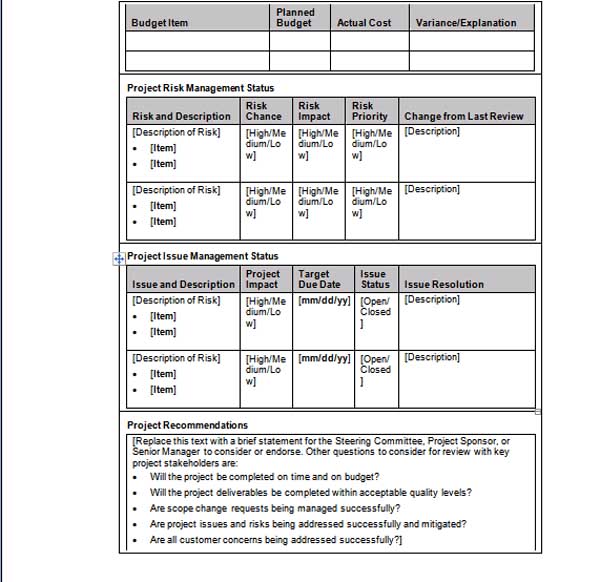
Our free project status report template includes the outline for corresponding project status details to the most important stakeholders of your project in a document file.
This project status report template will make it possible for you to let stakeholders informed of the in progress status of a project and will allow to guarantee that there are no surprises and shocks relating to the progress and outcome of the result. It is planned so as to make it effortless to communicate project information to those concerned. It shows one layout design you can use to effectively communicate a project’s status to respected clients, customers, and other stakeholders.
Below is the preview and download link to this Free Project Status Report Template,


And here goes download link to this Free Project Status Report Template,
Corresponding with stakeholders, sponsor, other team workers and other interested parties takes up quite a bit of project manager’s time. No matter how demanding your work may possibly be, there should at all times be time to regularly create a report on current project status. This simple form template will assist you to promptly report status on the given project.
Our free project status report template includes the outline for corresponding project status details to the most important stakeholders of your project in a document file.
This project status report template will make it possible for you to let stakeholders informed of the in progress status of a project and will allow to guarantee that there are no surprises and shocks relating to the progress and outcome of the result. It is planned so as to make it effortless to communicate project information to those concerned. It shows one layout design you can use to effectively communicate a project’s status to respected clients, customers, and other stakeholders.
Below is the preview and download link to this Free Project Status Report Template,


And here goes download link to this Free Project Status Report Template,
Wednesday, July 15, 2009
Business Card Word Template
Business cards are the key component of the contact. A Business Card is like a visiting card, which appears on a small paper card with one’s name. A written card identifies the bearer, presented for introduction when attending a business meeting. There are several formats of business cards. You can edit Business Card Template format and make it informative according to the nature of your business.
The information you are going to add must be relevant like
1. Company logo
2. Name of the contact person
3. Current designation in organization.
4. Current information
5. Phone No
6. Email Address
7. Address for correspondence
8. Company website
9. Hot products being offered on the back side of card.
Through Business Card Template you tell others about you and your business and services offered. We provide you different Sample Business Card Template through this website, so have a look .
The information you are going to add must be relevant like
1. Company logo
2. Name of the contact person
3. Current designation in organization.
4. Current information
5. Phone No
6. Email Address
7. Address for correspondence
8. Company website
9. Hot products being offered on the back side of card.
Through Business Card Template you tell others about you and your business and services offered. We provide you different Sample Business Card Template through this website, so have a look .
Monday, November 3, 2008
MS Word's Introduction And History
Microsoft Word Introduction
Microsoft Word is Microsoft's flagship word processing software. It was first released in 1983 under the name Multi-Tool Word for Xenix systems.[1][2][3] Versions were later written for several other platforms including IBM PCs running DOS (1983), the Apple Macintosh (1984), SCO UNIX, OS/2 and Microsoft Windows(1989). It is a component of the Microsoft Office system; however, it is also sold as a standalone product and included in Microsoft Works Suite. Beginning with the 2003 version, the branding was revised to emphasize Word's identity as a component within the Office suite; Microsoft began calling it Microsoft Office Word instead of merely Microsoft Word. The latest releases are Word 2007 for Windows and Word 2008 for Mac OS X.
Microsoft Word History

 Microsoft Word 5.1a (Macintosh)
 Office Word 2003
Microsoft Word is Microsoft's flagship word processing software. It was first released in 1983 under the name Multi-Tool Word for Xenix systems.[1][2][3] Versions were later written for several other platforms including IBM PCs running DOS (1983), the Apple Macintosh (1984), SCO UNIX, OS/2 and Microsoft Windows(1989). It is a component of the Microsoft Office system; however, it is also sold as a standalone product and included in Microsoft Works Suite. Beginning with the 2003 version, the branding was revised to emphasize Word's identity as a component within the Office suite; Microsoft began calling it Microsoft Office Word instead of merely Microsoft Word. The latest releases are Word 2007 for Windows and Word 2008 for Mac OS X.
Microsoft Word History
Word 1981 to 1989
Concepts and ideas of Word were brought from Bravo, the original GUI word processor developed at Xerox PARC. Bravo's creator Charles Simonyi left PARC to work for Microsoft in 1981. Simonyi hired Richard Brodie, who had worked with him on Bravo, away from PARC that summer.[4][5] On February 1, 1983, development on what was originally named Multi-Tool Word began.
Having renamed it Microsoft Word, Microsoft released the program October 25, 1983, for the IBM PC. Free demonstration copies of the application were bundled with the November 1983 issue of PC World, making it the first program to be distributed on-disk with a magazine.[6][1] However, it was not well received, and sales lagged behind those of rival products such as WordPerfect.[citation needed]
Word featured a concept of "What You See Is What You Get", or WYSIWYG, and was the first application with such features as the ability to display bold and italics text on an IBM PC.[1] Word made full use of the mouse, which was so unusual at the time that Microsoft offered a bundled Word-with-Mouse package. Although MS-DOS was a character-based system, Microsoft Word was the first word processor for the IBM PC that showed actual line breaks and typeface markups such as bold and italics directly on the screen while editing, although this was not a true WYSIWYG system because available displays did not have the resolution to show actual typefaces. Other DOS word processors, such as WordStar and WordPerfect, used simple text only display with markup codes on the screen or sometimes, at the most, alternative colors.[7]
As with most DOS software, each program had its own, often complicated, set of commands and nomenclature for performing functions that had to be learned. For example, in Word for MS-DOS, a file would be saved with the sequence Escape-T-S: pressing Escape called up the menu box, T accessed the set of options for Transfer and S was for Save (the only similar interface belonged to Microsoft's own Multiplan spreadsheet). As most secretaries had learned how to use WordPerfect, companies were reluctant to switch to a rival product that offered few advantages. Desired features in Word such as indentation before typing (emulating the F4 feature in WordPerfect), the ability to block text to copy it before typing, instead of picking up mouse or blocking after typing, and a reliable way to have macros and other functions always replicate the same function time after time, were just some of Word's problems for production typing.
Word for Macintosh, despite the major differences in look and feel from the DOS version, was ported by Ken Shapiro with only minor changes from the DOS source code,[citation needed] which had been written with high-resolution displays and laser printers in mind although none were yet available to the general public. Following the precedents of LisaWrite and MacWrite, Word for Macintosh attempted to add closer WYSIWYG features into its package. After Word for Mac was released in 1985, it gained wide acceptance.
There was no Word 2.0 for Macintosh. Instead, the second release of Word for Macintosh, shipped in 1987, was named Word 3.0; this was Microsoft's first attempt to synchronize version numbers across platforms. Word 3.0 included numerous internal enhancements and new features including the first implementation of the Rich Text Format (RTF) specification, but was plagued with bugs. Within a few months Word 3.0 was superseded by Word 3.01, which was much more stable. All registered users of 3.0 were mailed free copies of 3.01, making this one of Microsoft's most expensive mistakes up to that time.
Word 1990 to 1995

The first version of Word for Windows was released in 1989 at a price of 500 US dollars[citation needed]. With the release of Windows 3.0 the following year, sales began to pick up (Word for Windows 1.0 was designed for use with Windows 3.0, and its performance was poorer with the versions of Windows available when it was first released). The failure of WordPerfect to produce a Windows version proved a fatal mistake. It was version 2.0 of Word, however, that firmly established Microsoft Word as the market leader.[citation needed]
After MacWrite, Word for Macintosh never had any serious rivals, although programs such as Nisus Writer provided features such as non-contiguous selection which were not added until Word 2002 in Office XP. In addition, many users complained that major updates reliably came more than two years apart, too long for most business users at that time.
Word 5.1 for the Macintosh, released in 1992, was a very popular word processor due to its elegance, relative ease of use, and feature set. However, version 6.0 for the Macintosh, released in 1994, was widely derided, unlike the Windows version. It was the first version of Word based on a common codebase between the Windows and Mac versions; many accused it of being slow, clumsy and memory intensive. In response to user requests, Microsoft offered a free "downgrade" to Word 5.1 for dissatisfied Word 6.0 purchasers.
With the release of Word 6.0 in 1993 Microsoft again attempted to synchronize the version numbers and coordinate product naming across platforms; this time across the three versions for DOS, Macintosh, and Windows (where the previous version was Word for Windows 2.0). There may have also been thought to matching the current version 6.0 of WordPerfect for DOS and Windows, Word's major competitor. However, this wound up being the last version of Word for DOS. As well, subsequent versions of Word were no longer referred to by version number, and were instead named after the year of their release (e.g. Word 95 for Windows, synchronizing its name with Windows 95, and Word 98 for Macintosh), once again breaking the synchronization.
When Microsoft became aware of the Year 2000 problem, it released the entire version of DOS port of Microsoft Word 5.5 instead of getting people to pay for the update. As of October 2008, it is still available for download from Microsoft's web site.[8]
Word 6.0 was actually the second attempt to develop a common codebase version of Word. The first, code-named Pyramid, had been an attempt to completely rewrite the existing Word product. It was abandoned when it was determined that it would take the development team too long to rewrite and then catch up with all the new capabilities that could have been added in the same time without a rewrite. Proponents of Pyramid claimed it would have been faster, smaller, and more stable than the product that was eventually released for Macintosh, which was compiled using a beta version of Visual C++ 2.0 that targets the Macintosh, so many optimizations have to be turned off (the version 4.2.1 of Office is compiled using the final version), and sometimes use the Windows API simulation library included.[9] Pyramid would have been truly cross-platform, with machine-independent application code and a small mediation layer between the application and the operating system.
More recent versions of Word for Macintosh are no longer ported versions of Word for Windows although some code is often appropriated from the Windows version for the Macintosh version.[citation needed]
Later versions of Word have more capabilities than just word processing. The Drawing tool allows simple desktop publishing operations such as adding graphics to documents. Collaboration, document comparison, multilingual support, translation and many other capabilities have been added over the years.[citation needed]
Word 97

Word 95 & 97 icon
Word 97 had the same general operating performance as later versions such as Word 2000. This was the first copy of Word featuring the Office Assistant, "Clippy," which was an animated helper used in all Office programs. This was a take over from the earlier launched concept in Microsoft Bob.
Word 98
Word 98 for the Macintosh gained many features of Word 97, and was bundled with the Macintosh Office 98 package. Document compatibility reached parity with Office 97 and Word on the Mac became a viable business alternative to its Windows counterpart. Unfortunately, Word on the Mac in this and later releases also became vulnerable to future Macro viruses that could compromise Word (and Excel) documents, leading to the only situation where viruses could be cross-platform. A Windows version of this was only bundled with the Korean/Japanese Microsoft Office 97 Powered By Word 98 and could not be purchased separately.
Word 2000
For most users, one of the most obvious changes introduced with Word 2000 (and the rest of the Office 2000 suite) was a clipboard that could hold multiple objects at once. Another noticeable change was that the Office Assistant, whose frequent unsolicited appearance in Word 97 had annoyed many users, was changed to be less intrusive.
Word 2001/Word X
Word 2001 was bundled with the Macintosh Office for that platform, acquiring most, if not all, of the feature set of Word 2000. Released in October 2000. Word 2001 was also sold individually apart from the Office suite. The Macintosh version, Word X, released in 2001, was the first version to run natively on (and require) Mac OS X.
Word 2002/XP
Word 2002 was bundled with Office XP and was released in 2001. It had many of the same features as Word 2000 but had a major new feature called the 'Task Panes', which gave quicker information and control to a lot of features that were only available in modal dialog boxes before. One of the key advertising strategies for the software was the removal of the Office Assistant in favor of a new help system, although it was simply disabled by default.
Word 2003

For the 2003 version, the Office programs, including Word, were rebranded to emphasize the unity of the Office suite, so that Microsoft Word officially became Microsoft Office Word.
Word 2004
A new Macintosh version of Office was released in May 2004. Substantial cleanup of the various applications (Word, Excel, PowerPoint) and feature parity with Office 2003 (for Microsoft Windows) created a very usable release. Microsoft released patches through the years to eliminate most known Macro vulnerabilities from this version. While Apple released Pages and the open source community created NeoOffice, Word remains the most widely used word processor on the Macintosh.
Word 2007
The release includes numerous changes, including a new XML-based file format, a redesigned interface, an integrated equation editor and bibliographic management. Additionally, an XML data bag was introduced, accessible via the object model and file format, called Custom XML - this can be used in conjunction with a new feature called Content Controls implement structured documents. It also has contextual tabs, which are functionality specific only to the object with focus, and many other features like Live Preview (which enables you to view the document without making any permanent changes), Mini Toolbar, Super-tooltips, Quick Access toolbar, SmartArt, etc.
Word 2007 uses a new file format called docx. Word 2000-2003 users on Windows systems can install a free add-on called the "Microsoft Office Compatibility Pack" to be able to open, edit, and save the new Word 2007 files.[10] Alternatively, Word 2007 can save to the old doc format of Word 97-2003.[11][12]
Word 2008
Word 2008 is the most recent version of Microsoft Word for the Mac, released on January 15, 2008. It includes some new features from Word 2007, such as a ribbon-like feature that can be used to select page layouts and insert custom diagrams and images. Word 2008 also features native support for the new Office Open XML format, although the old .doc format can be set as a default.[13]
Subscribe to:
Posts (Atom)